OAuth Authorization Code Flow: How an App Gets Access to Tokity

id_token.Tokity supports a single OAuth flow: the authorization code flow, following the OAuth 2.1 specification. This means PKCE is required on every request — there's no legacy implicit flow, and no way to skip PKCE regardless of whether your app is public or confidential.
Both personal and system-wide consent use this same flow. The steps are identical — only the authorization endpoint and the scopes you can request differ, which we'll call out below.
Discovering endpoints
Each tenant instance publishes its own OAuth metadata, following the standard .well-known discovery pattern:
- Personal grants:
/.well-known/oauth-authorization-server - System-wide grants:
/.well-known/oauth-authorization-server/system-wide
Since Tokity is single-tenant (each customer has their own instance), the endpoints returned in this metadata are specific to that instance — don't hardcode a host from documentation examples. Always resolve endpoints from your own tenant's metadata document rather than assuming a shared URL.
The metadata only lists the standard OAuth/OIDC scopes (offline_access, and for personal grants, openid, profile, email). Tokity has a much larger set of product-specific scopes beyond these, which aren't enumerated in the discovery document. Instead, the full list of available scopes for your tenant can be retrieved from these endpoints, per grant target:
/api/v4/tech/configs/features/oauth/scopes/system— scopes available to system-wide grants/api/v4/tech/configs/features/oauth/scopes/tech_portal— scopes available to agents (personal grants)/api/v4/tech/configs/features/oauth/scopes/client_portal— scopes available to contacts (personal grants)
These endpoints require you to be logged in as an agent to call them.
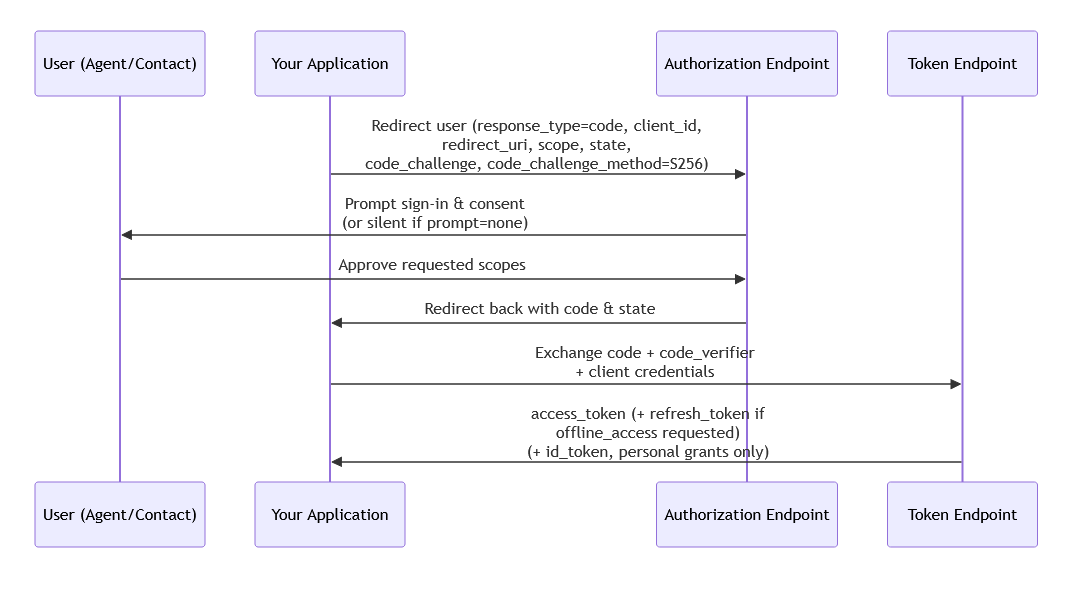
Step 1: Redirect the user to the authorization endpoint
Send the user's browser to the authorization_endpoint from your tenant's metadata, with your standard authorization code + PKCE parameters (response_type=code, client_id, redirect_uri, scope, state, code_challenge, code_challenge_method=S256).
- For personal consent (an agent or contact granting access), use the personal
authorization_endpoint. - For system-wide consent (admin granting access on behalf of the tenant), use the system-wide
authorization_endpointinstead.
Only S256 is supported for code_challenge_method — plain is not accepted.
Step 2: User grants consent
The user is prompted to sign in (if not already) and approve the requested scopes. Once approved, they're redirected back to your redirect_uri with an authorization code and the state you provided.
You can influence this prompt behavior using the prompt parameter — supported values are consent, login, and none. Their meaning depends on the grant type:
prompt=login— forces the user to re-authenticate, even if they already have a valid session. This applies to both personal and system-wide grants, and is a useful security control: it prevents someone from approving a grant just because a browser happens to be signed in on a shared or unattended machine, without confirming it's actually that person.prompt=consent— forces the consent screen to show, even if the requested scopes were already granted previously. Also applies to both grant types.prompt=none— requests a fully silent re-authorization, with no UI shown at all. This only succeeds if the user already has a valid session and has previously granted the requested scopes; otherwise the request fails rather than falling back to an interactive prompt. This is only meaningful for personal grants, since it relies on reusing an existing individual session — system-wide consent has no equivalent session to reuse silently.
Implementing prompt correctly (especially handling the failure case for prompt=none) takes some care on the developer's side, but it's a useful tool for balancing a smooth user experience against stronger identity assurance where it matters.
Step 3: Exchange the code for tokens
Call the token_endpoint (the same endpoint for both personal and system-wide) with the authorization code, your code_verifier, and your client authentication (see below). A successful exchange returns an access_token, and — if you requested offline_access — a refresh_token.
For personal grants only, if openid was included in the requested scopes, the response also includes an id_token. System-wide grants never return an id_token, since there's no individual identity to represent — openid isn't a valid scope for system-wide consent in the first place.
Client authentication
The token endpoint currently accepts client_secret_post or client_secret_basic — in other words, a client secret is required on this instance. Whether an app can skip the secret entirely depends on two things both being true: the app registration must be configured as a public application, and the tenant's global OAuth setting must allow secret-less authorization. If either isn't the case, a client secret is required. We'll cover public vs. confidential apps, and how the secret setting works, in more detail in Confidential vs. Public Apps & Client Secrets.
DPoP (optional)
DPoP is not required. If you choose to send a DPoP proof with your token request, the resulting token becomes DPoP-bound to that proof going forward. Supported signing algorithms are ES256, RS256, and PS256.
What's next
With tokens in hand, see Viewing & Managing Authorized Sessions and Consent to understand how the resulting session and consent grant can be reviewed or revoked, and use the scope endpoints above to see the full set of scopes available for your tenant.