Table of Contents
Ticket Widget: Form Type

The Form type is for a quick decision. When an automation or AI reaches a point where it needs a human to choose, it shows one short question with a few choices. The agent picks, and the provider carries on based on the answer.
In short: you return one question with a short list of choices. The user picks one (single choice) or several (multiple choice) and presses the primary action. Your API receives the answer and decides what to do next.
This type is deliberately limited. It is not a way to collect information from users. For that, use the inline form feature.
Typical uses:
- An automation asks "Approve this change?" and either continues or stops.
- An AI assistant is unsure which system is affected and offers a few options instead of guessing.
- A process asks "Retry or skip this step?" after a failure.
How a decision flows
- Your automation reaches a point that needs a human, and returns a Form widget.
- The agent chooses and presses the primary action.
- The client sends the answer to the action's
urlinform. This is a real submission. - Your API reads the answer and returns the next widget. Different answers can lead to different results, such as a Progress widget showing the chosen path.
Because your API defines the choices, it also decides what each answer means.
One question per widget
A Form widget holds one question. Its value is a single field, not a list.
Single or multiple choice
The field's own type decides how the user answers.
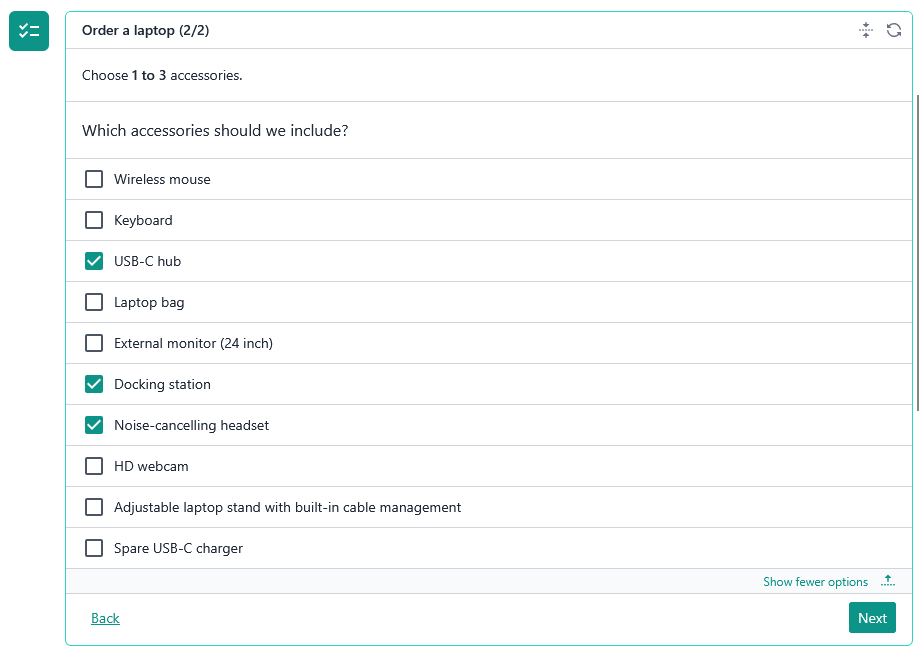
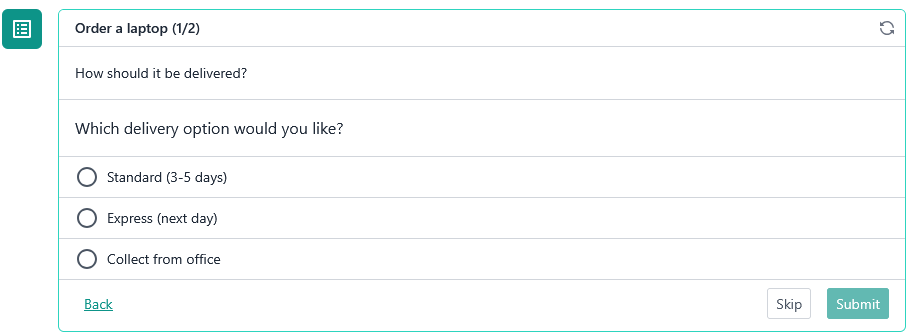
single_choice: the user picks one. Shown as radio buttons.multiple_choice: the user picks any number. Shown as check boxes.
There is no way to set a minimum or maximum number of selections. Design the question so that any answer is valid, or handle it when the answer is submitted.
The question and the choices
- The field's
nameis the question, shown above the choices. It can be conversational, such as "Which system should I route this to?". - The field's
identifieris the key under which the answer comes back inform. - Each choice has a
name, which the user sees, and anidentifier, which you receive back.
Keep identifiers within 100 characters. Longer ones are cut off by the client, and a cut identifier no longer matches the one you sent. The same applies to the field's identifier.
How many choices
You can send up to 10 choices.
- 5 or fewer: all are shown. There is no expand button.
- 6 to 10: the first 5 are always shown. The rest appear when the user expands.
Fewer is better. This is meant for a quick decision, and you can't limit how many choices the user picks. If you have more than 5 options, consider whether the decision can be simpler.
Preselecting an answer
To show an answer as already selected, return it in form on the widget. The key is the field's identifier and the value lists the chosen choice identifiers.
"form": { "system": { "choices": ["email"] } }When the user can continue
The primary action stays disabled until the user has selected something. The leading and secondary actions are always available, so the user can go back or skip without deciding.
Leading and secondary send the current selection with the request. That is not a submission, so don't act on it. Only the primary action submits. If the agent skips, the automation should wait or take its default path. See the Actions article.
Receiving the answer
The answer arrives in the request body under form, keyed by the field's identifier. The value is a list of chosen choice identifiers. For a single choice the list has one entry.
{
  "form": {
    "delivery": { "choices": ["express"] }
  }
}
See How the Widget Is Requested for the full body.
Refresh
A Form widget always refreshes manually. You can't set a refresh mode on it. The widget changes only when the user presses an action.
Invalid answers
Your API defines the choices, so handling an identifier it doesn't recognise is the provider's responsibility. If the API returns an error, the client shows an error. See the error article.
Example
{
  "type": "form",
  "title": "Deployment failed",
  "description": "The database migration step failed. How should I continue?",
  "value": {
    "type": "single_choice",
    "identifier": "action",
    "name": "What should I do next?",
    "choices": [
      { "identifier": "retry", "name": "Retry the step" },
      { "identifier": "skip", "name": "Skip and continue" },
      { "identifier": "stop", "name": "Stop the deployment" }
    ]
  },
  "form": { "action": { "choices": ["retry"] } },
  "secondaryAction": { "label": "Decide later", "url": "/widgets/deploy/wait" },
  "primaryAction": { "label": "Confirm", "url": "/widgets/deploy/decide" }
}
Type reference
export interface FormTicketWidgetContent extends TicketWidgetContentBase<TicketWidgetField> {
  readonly type: 'form';
}

export type TicketWidgetField = TicketWidgetSingleChoiceField | TicketWidgetMultiChoiceField;

export interface TicketWidgetSingleChoiceField extends TicketWidgetFieldBase {
  readonly type: 'single_choice';

  /**
   * Maximum 10 choices. Rendered as radio/inline options up to 5 choices;
   * beyond 5, rendered as a dropdown select.
   */
  readonly choices: ReadonlyArray<TicketWidgetFieldChoice>;
}

export interface TicketWidgetMultiChoiceField extends TicketWidgetFieldBase {
  readonly type: 'multiple_choice';

  /**
   * Maximum 10 choices. Up to 5 shown by default; beyond 5, remaining
   * choices are collapsed behind an "expand" action.
   */
  readonly choices: ReadonlyArray<TicketWidgetFieldChoice>;
}

export interface TicketWidgetFieldBase {
  /**
   * Maximum 100 characters. Hard-truncated (client-side) beyond this length.
   */
  readonly identifier: string;

  readonly type: TicketWidgetFieldType;

  /**
   * The question/prompt presented to the user for this field — bots may
   * phrase this conversationally rather than as a terse label.
   * Maximum 500 characters. Hard-truncated (client-side) beyond this length.
   */
  readonly name: string;
}

export interface TicketWidgetFieldChoice {
  /**
   * Maximum 250 characters. Hard-truncated (client-side) beyond this length.
   */
  readonly name: string;
  /**
   * Maximum 100 characters. Hard-truncated (client-side) beyond this length.
   */
  readonly identifier: string;
}


export interface TicketWidgetContentBase<T> {
  readonly type: TicketWidgetContentType;

  readonly refreshMode?: TicketWidgetRefreshMode;
  readonly refreshIntervalSec?: number;

  readonly icon?: CustomSvgContent;

  /**
   * Maximum 256 characters. Hard-truncated (client-side) beyond this length.
   */
  readonly title: string;
  readonly titleColour?: ContentColor;

  /**
   * Markdown content, does not support HTML embed.
   * Maximum 10,000 characters. Hard-truncated (client-side) beyond this length.
   */
  readonly description?: string;

  readonly borderColour?: ContentColor;

  readonly value: T;

  /**
   * Action rendered on the far left, isolated from the secondary/primary
   * action group (e.g. "back" in a multi-step form).
   *
   * Never gated by form validation: always enabled, even when the form is
   * incomplete. When `form` is present, the current (possibly partial)
   * answers are sent with the request so the provider can restore them
   * (e.g. when the user steps back). This is NOT a submission; the provider
   * must not validate, persist or act on the answers.
   */
  readonly leadingAction?: TicketWidgetAction;

  /**
   * Secondary action rendered on the right, before the primary action.
   * Typically a lower-emphasis action (e.g. "cancel", "skip").
   *
   * Never gated by form validation: always enabled, even when the form is
   * incomplete. When `form` is present, the current (possibly partial)
   * answers are sent with the request so the provider can remember them.
   * This is NOT a submission; the provider must not validate, persist or
   * act on the answers.
   */
  readonly secondaryAction?: TicketWidgetAction;

  /**
   * Primary action rendered on the far right, the main call-to-action
   * for this widget (e.g. "next", "submit").
   *
   * When `form` is present, disabled until the form is complete (all
   * required fields answered). This is the only action that submits the
   * form: the answers are sent as a submission, and the provider should
   * validate and act on them.
   */
  readonly primaryAction?: TicketWidgetAction;

  /**
   * Answers submitted by the user, keyed by field identifier, and sent back
   * to the provider on the next request.
   *
   * Limits:
   * - Maximum 20 entries. Entries beyond this are dropped.
   * - Key: maximum 100 characters. Hard-truncated (client-side) beyond this length.
   * - A null result is replaced with an empty result.
   * - Invalid results are dropped, not converted.
   * - Each choice identifier is hard-truncated (client-side) to 100 characters.
   * - Maximum 10 choices per result. Choices beyond this are dropped.
   */
  readonly form?: Record<string, TicketWidgetFieldResult>;

  /**
   * Arbitrary provider-defined data carried across requests. The client
   * persists whatever the provider returns here and sends it back verbatim
   * on the next request. Providers do not need to store session state
   * themselves; the round trip through the client is the only state store.
   *
   * Limits (anything exceeding them is dropped, not truncated):
   * - Maximum 20 entries.
   * - Key: maximum 100 characters.
   * - Value: maximum 1,000 characters.
   * - Non-string values are dropped, not converted.
   */
  readonly state?: Record<string, string>;
}