Table of Contents
Ticket Widget: Description Type

The Description widget shows the facts about one thing, such as a contact, an asset or an order. Each fact is a label with a value. Use it when the agent needs to see details at a glance without leaving the ticket.
In short: you return a list of rows. Each row has a title (the label), optional details (the value) and an optional type that tells the client how to show the value.
Typical uses:
- A contact: is the person a VIP, when did they last log in, which company are they from.
- An order: status, total cost, due date.
- An asset: owner, purchase date, warranty end.
The shared parts (icon, title, description, colours, collapse) are covered in Widget Anatomy and Styling. Actions are covered in the Actions article.
How it looks
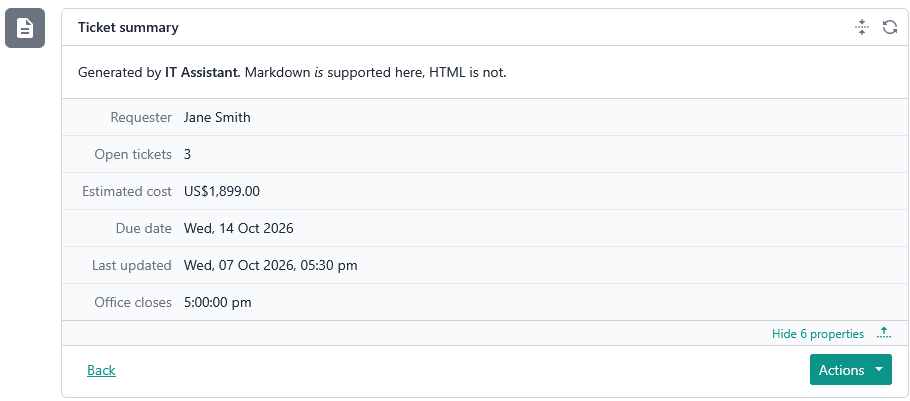
On a large screen the rows appear in a table-like layout: the label on the left and the value on the right. The label is shown in a subtle style, so the value stands out.
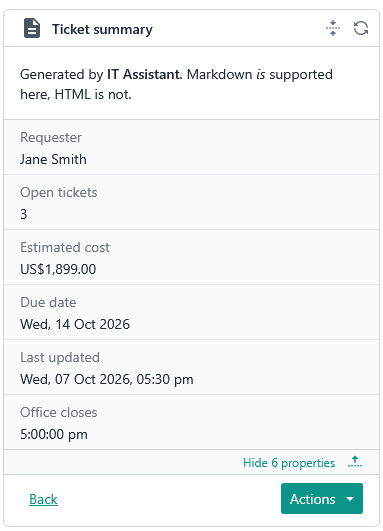
On a small screen each row becomes a label with its value directly below it, like a dt and dd pair in HTML.
When the widget is collapsed, the rows are hidden. The header and description stay visible.
Rows
Each row has three fields:
titleis required. It is the label, for example "Last login". Up to 40 characters. Longer text is cut off by the client.detailsis optional. It is the value, for example "2026-04-21T15:34:30+08:00". Up to 250 characters. Longer text is cut off by the client.typeis optional. It says how to read and displaydetails. See the next section.
details is always a string, whatever its type. This includes numbers and currency.
Types
The type decides how details is shown.
string: shown as it is.number: the client tries to readdetailsas a number and shows it. Integers and decimals both work.currency: read like a number, then shown with a$prefix.date: a date without a time.time: a time without a date.date_time: a full date and time, shown in the current user's local time zone.
Numbers and currency
Send the number as a string in plain form, with no thousands separators. Use a dot for decimals.
- Valid:
"1000","1000.34","-5" - Not valid:
"1,000","1 000","1.000,34"
Whether it is a whole number or has decimals does not matter, as long as it is a valid number in programming terms.
For currency, send only the amount. The client adds the $ prefix. Do not add the symbol yourself, or it will not be read as a number.
If the value can't be read as a number, see "When a value can't be read".
Dates and times
All dates and times use ISO 8601, and they are read strictly.
Type | Format | Examples |
|
|
|
|
|
|
| Full ISO 8601 date and time with an offset, or |
|
For date_time, the client converts the value to the viewer's local time. The same row can therefore read differently for two users in different time zones. This is expected.
When a value can't be read
If details does not match its type, the client does not hide it or show an error. It shows the raw text exactly as sent. A date row with "23/03/2022" appears as 23/03/2022, unformatted. Check the format first if a value looks unformatted.
Example
{
  "type": "description",
  "title": "Requester",
  "value": [
    { "title": "Name", "details": "Jane Smith" },
    { "title": "VIP", "details": "Yes", "type": "string" },
    { "title": "Open tickets", "details": "3", "type": "number" },
    { "title": "Total spend", "details": "12500.50", "type": "currency" },
    { "title": "Registered", "details": "2022-03-23", "type": "date" },
    { "title": "Usual start time", "details": "08:30", "type": "time" },
    { "title": "Last login", "details": "2026-04-21T15:34:30+08:00", "type": "date_time" }
  ]
}
Type reference
export interface DescriptionTicketWidgetContent extends TicketWidgetContentBase<
  ReadonlyArray<TicketWidgetDescriptionItem>
> {
  readonly type: 'description';
}

export interface TicketWidgetDescriptionItem {
  /**
   * Maximum 40 characters. Hard-truncated (client-side) beyond this length.
   */
  readonly title: string;
  /**
   * Maximum 250 characters. Hard-truncated (client-side) beyond this length.
   */
  readonly details?: string;
  readonly type?: TicketWidgetDescriptionType;
}

export type TicketWidgetDescriptionType =
  | 'string'
  | 'number'
  | 'currency'
  | 'date'
  | 'date_time'
  | 'time';


export interface TicketWidgetContentBase<T> {
  readonly type: TicketWidgetContentType;

  readonly refreshMode?: TicketWidgetRefreshMode;
  readonly refreshIntervalSec?: number;

  readonly icon?: CustomSvgContent;

  /**
   * Maximum 256 characters. Hard-truncated (client-side) beyond this length.
   */
  readonly title: string;
  readonly titleColour?: ContentColor;

  /**
   * Markdown content, does not support HTML embed.
   * Maximum 10,000 characters. Hard-truncated (client-side) beyond this length.
   */
  readonly description?: string;

  readonly borderColour?: ContentColor;

  readonly value: T;

  /**
   * Action rendered on the far left, isolated from the secondary/primary
   * action group (e.g. "back" in a multi-step form).
   *
   * Never gated by form validation: always enabled, even when the form is
   * incomplete. When `form` is present, the current (possibly partial)
   * answers are sent with the request so the provider can restore them
   * (e.g. when the user steps back). This is NOT a submission; the provider
   * must not validate, persist or act on the answers.
   */
  readonly leadingAction?: TicketWidgetAction;

  /**
   * Secondary action rendered on the right, before the primary action.
   * Typically a lower-emphasis action (e.g. "cancel", "skip").
   *
   * Never gated by form validation: always enabled, even when the form is
   * incomplete. When `form` is present, the current (possibly partial)
   * answers are sent with the request so the provider can remember them.
   * This is NOT a submission; the provider must not validate, persist or
   * act on the answers.
   */
  readonly secondaryAction?: TicketWidgetAction;

  /**
   * Primary action rendered on the far right, the main call-to-action
   * for this widget (e.g. "next", "submit").
   *
   * When `form` is present, disabled until the form is complete (all
   * required fields answered). This is the only action that submits the
   * form: the answers are sent as a submission, and the provider should
   * validate and act on them.
   */
  readonly primaryAction?: TicketWidgetAction;

  /**
   * Answers submitted by the user, keyed by field identifier, and sent back
   * to the provider on the next request.
   *
   * Limits:
   * - Maximum 20 entries. Entries beyond this are dropped.
   * - Key: maximum 100 characters. Hard-truncated (client-side) beyond this length.
   * - A null result is replaced with an empty result.
   * - Invalid results are dropped, not converted.
   * - Each choice identifier is hard-truncated (client-side) to 100 characters.
   * - Maximum 10 choices per result. Choices beyond this are dropped.
   */
  readonly form?: Record<string, TicketWidgetFieldResult>;

  /**
   * Arbitrary provider-defined data carried across requests. The client
   * persists whatever the provider returns here and sends it back verbatim
   * on the next request. Providers do not need to store session state
   * themselves; the round trip through the client is the only state store.
   *
   * Limits (anything exceeding them is dropped, not truncated):
   * - Maximum 20 entries.
   * - Key: maximum 100 characters.
   * - Value: maximum 1,000 characters.
   * - Non-string values are dropped, not converted.
   */
  readonly state?: Record<string, string>;
}