Getting Started with DeskDirector
DeskDirector Portals
Browser Support
What is the DeskDirector Admin Portal?
What is the DeskDirector Tech Portal
What is the DeskDirector Client Portal?
Desktop Portal
Managing Your Account
Admin Essentials
DeskDirector Features Overview
Logging in to DeskDirector
User Profiles & Profile Pictures
Managing Tickets with DeskDirector
Office Hours
Getting Started with the Solution Library
How Searching Works
Embedding Help Page Media
Get started with the DeskDirector Power Automate Connector
Features
Portal Customization
Forms
Service Catalogue
Communication
Email Connectors
Notifications
Email Notifications
Actionable Messages for Emails
Real-Time Chats
Email Template Engine
Surveys
Broadcasts
Generative AI
DeskDirector with Generative AI
Ticket Summary for TECH Portal
Setting up AI Service Providers
Microsoft Foundry for DeskDirector
Knowledge Bases for AI Assistants
Custom Tools for AI Assistants
AI Assistants in DeskDirector
Advanced
Login & Authentication
Contact Groups
Custom Domains
File Storage
Dashboard
Accounts
Contacts
Approvals
Tags
Task Lists
The Learning Center
Portal Deep Linking
Auditing & Analytics
Microsoft Power Automate
Actions
Solutions
Featured Solution: Teams Ticket Discussion
Power Automate Template Gallery
Featured Solution: Ticket Briefing
Power Automate Administration
DeskDirector Power Platform Connector Reference
Power Automate Connector - Setting up your first flow
Microsoft Teams App
Introducing the DeskDirector for Microsoft Team App
Installing the Microsoft Teams App (Client Mode)
Installing the Microsoft Teams App (TECH Mode)
Setting up Tags for Teams Discussions (TECH Portal)
Branding the DeskDirector Teams App
DeskDirector Teams App Notifications
Contact Groups Integration with Microsoft Teams
Setting up Content Security Policy (CSP)
Advanced topic: Setting up Tech & Client Mode in the same tenancy
Integrating Microsoft Teams with DeskDirector Tech Portal
Smart Alerts for TECH Users
Integrations
Developer Resources
Getting Started
What is the Toki Iti API
API Versions & Routes
Roles & Scopes
Authorization Options
Querying the API
How to Change an Entity Through the API
API Key Authorization
OAuth Fundamentals
Understanding OAuth for Tokity Integrations: Key Concepts
OAuth Authorization Code Flow: How an App Gets Access to Tokity
OAuth App Registration
How to Register an OAuth App to Integrate with Tokity
Choosing an OAuth App Type: Confidential vs. Public Apps and Client Secrets
OAuth Personal Secrets: What They Are and When to Use Them
OAuth Administration
Configuring OAuth Settings in Tokity
Managing OAuth Authorized Sessions and User Consent
Granting OAuth Admin Consent at the Root Level
API Response Control
Uploading Attachments (Ticket API)
The Prefer Header — Overview
Controlling Returned Data (Ticket API)
Controlling Returned Data (Form Result API)
Controlling Returned Data (Workspace API)
Workspace Ordering
How Workspace Ordering Works
Creating and Reordering Workspace Groups
Adding and Reordering Tickets in a Workspace Group
Data Sync & Notifications
Delta API: Tracking Changes Over Time
Webhooks vs. Events — Differences, When to Use Which
Verifying Webhook and Event Payloads (HMAC Signature)
Ticket Widgets
Ticket Widget: Overview
How the Widget Is Requested
Ticket Widget Anatomy and Styling
Ticket Widget Actions: Leading, Secondary and Primary
Ticket Widget: Progress Type
Ticket Widget: List Type
Ticket Widget: Description Type
Ticket Widget: Form Type
Ticket Widget: Control When a Widget Refreshes
Ticket Widget: Form Results and State Across Steps
Ticket Widget: Error Responses and Debugging
Ticket Widget: Building a Multi-Step Request
Glossary
Security
Troubleshooting
Troubleshooting via Web Developer Tools
Permissions & Access - Common Issues
Contact DeskDirector Support
Troubleshooting DeskDirector Connection Issues
Desktop Portal - Common Issues
Contact Impersonation
Approvals - Common Issues
Microsoft Teams App - Common Issues
Email & Email Delivery - Common Issues
Login & Authentication - Common Issues
DeskDirector Desktop App - Installation Issues
Table of Contents
- All Categories
- Features
- Approvals
Approvals
 Updated
by Niamh Ferns
Updated
by Niamh Ferns
Approvals Overview
Approvals allow your clients to have some control over what tickets make their way to you. Approval tickets are easy to set up, and in this article, we'll give you an introduction and guide on getting approvals incorporated into your service catalogues.
The Approval Workflow is triggered after a client logs a service type that's configured with an approval status. These service types are fed from and configured in the DeskDirector Admin Portal.
Approval Process
- A ticket is logged by an end user (assuming this is a ticket under an approval status)
- Then, approvers who have been selected for the client receive an email informing them that a ticket has been submitted that needs their approval. (These same people will also see the
Approvalssection in their DeskDirector Portal showing any tickets that need their approval.) - From here, they can open the ticket and approve or decline it.
- If the ticket is declined, the reason for this decision is added to the ticket as a ticket note. Whatever the decision is, the ticket status will change accordingly (Approval Granted/Declined) based on what you set in the Admin Portal. After an approval is actioned, an email is sent to all approvers letting them know that the ticket has been approved or declined.
The Approval List
As the name suggests, the approval list will show every ticket that is pending approval. It will show who submitted the ticket, when it was created, the ticket title and the ticket number.
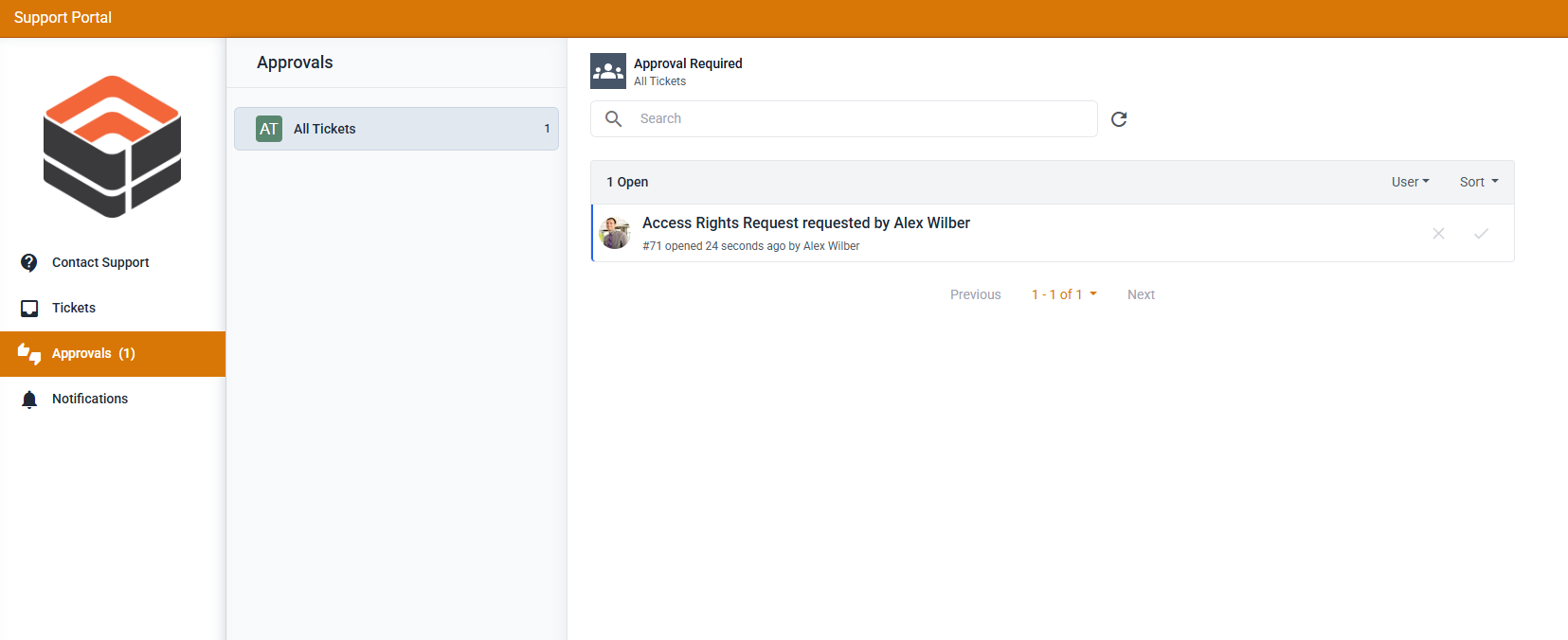
If you are looking for a specific ticket to approve, use the "Search tickets" form. You can use any keyword from the ticket title, owner, or ticket number for the search keyword.
Approving/Declining a Ticket
To approve/deny approval for a ticket, just open the ticket, review the information, and once everything looks good, scroll all the way down, and you should see this at the end of the ticket timeline.
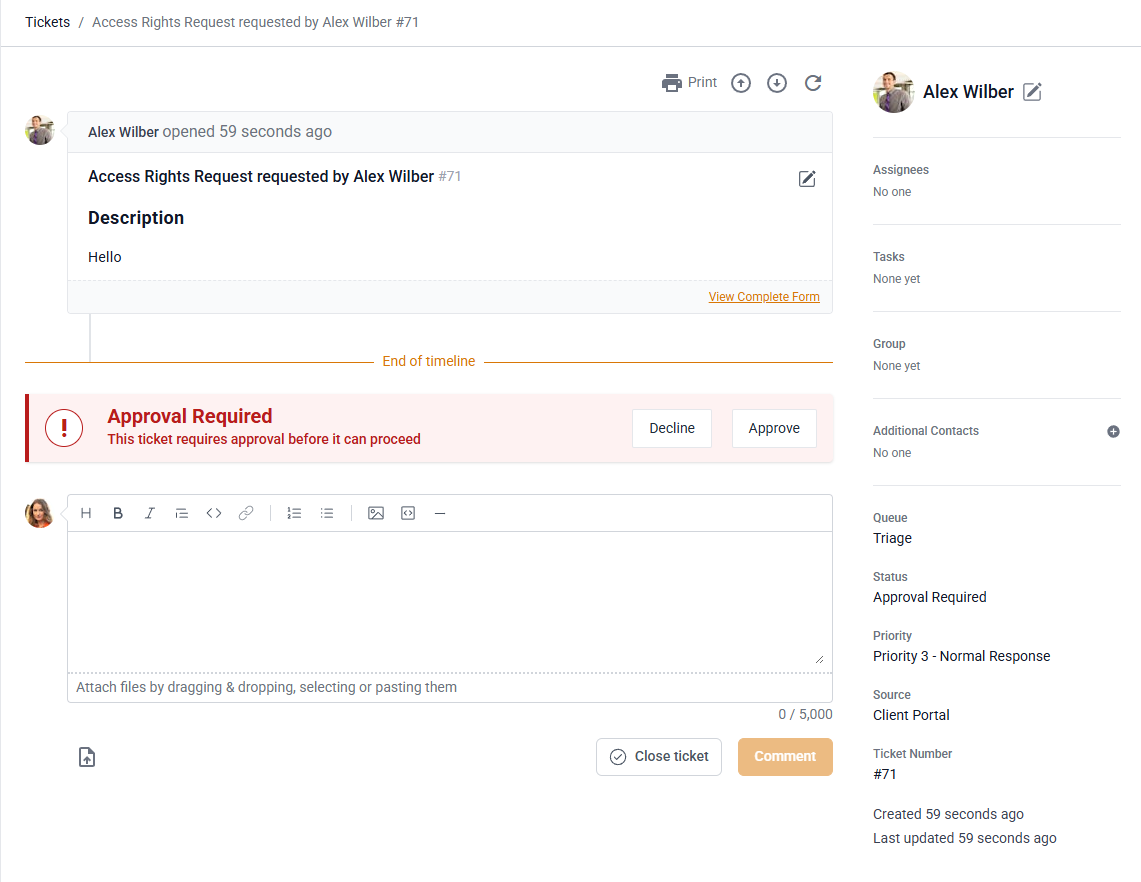
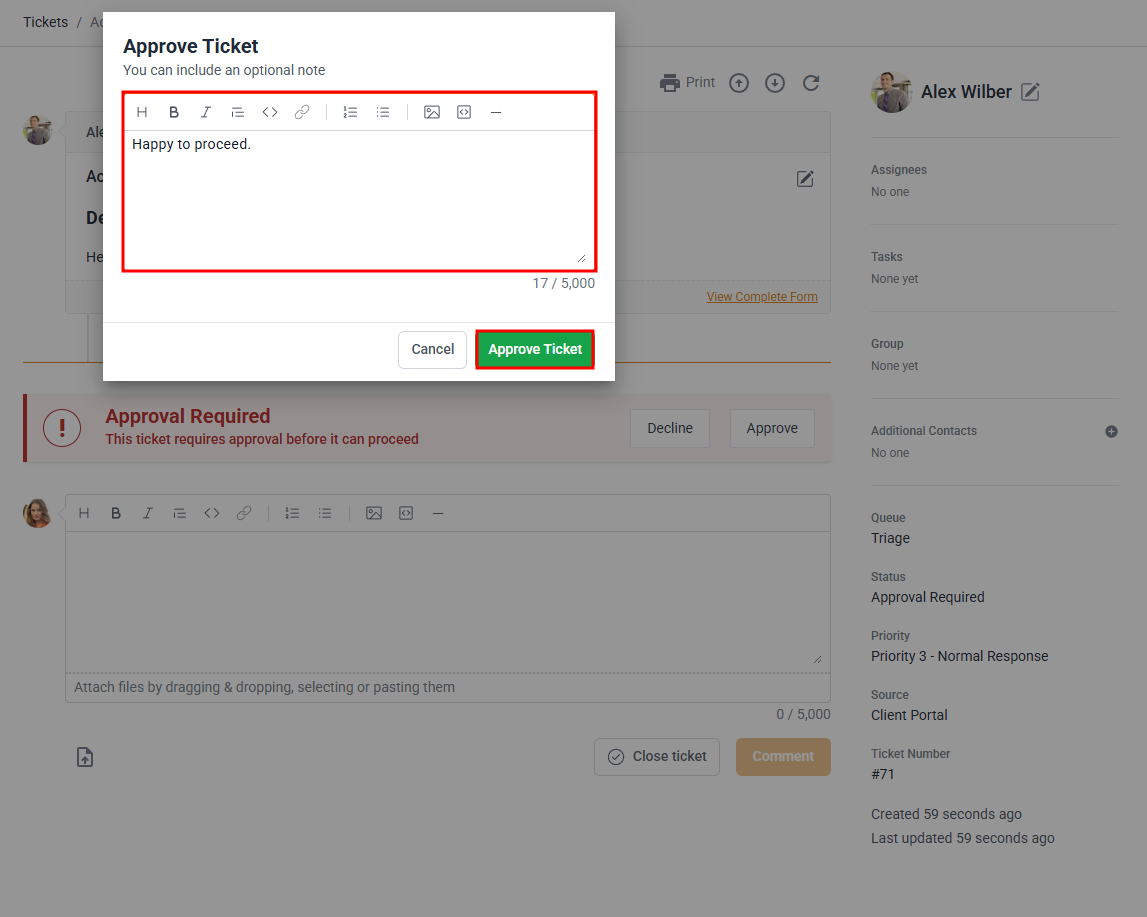
Whether you click on Decline or Approve, a pop-up will appear asking you to add a note. Any reason added to approve/decline the ticket will be added as a public ticket note.
Approval Emails
When an approval email is triggered from DeskDirector, we use your email notification settings to send the email. If there are no email senders configured, we will use the DeskDirector defaults.
Configuring Approvals
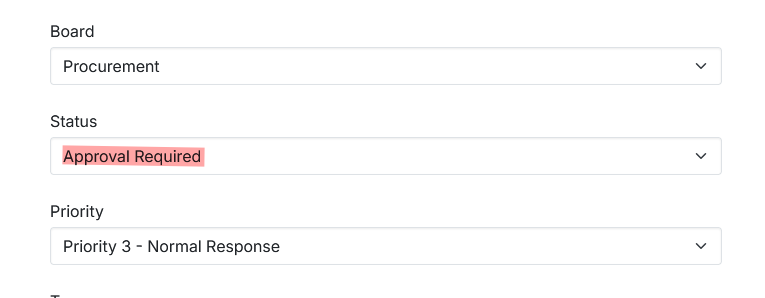
For DeskDirector to recognise tickets as requiring approval, you would need to configure a service type to be raised under an approval status or have an agent/automation change the status of an existing ticket to "Approval Required".
For users to see the approvals tab, they will need to have the approval permissions granted.
Additional Approval Settings
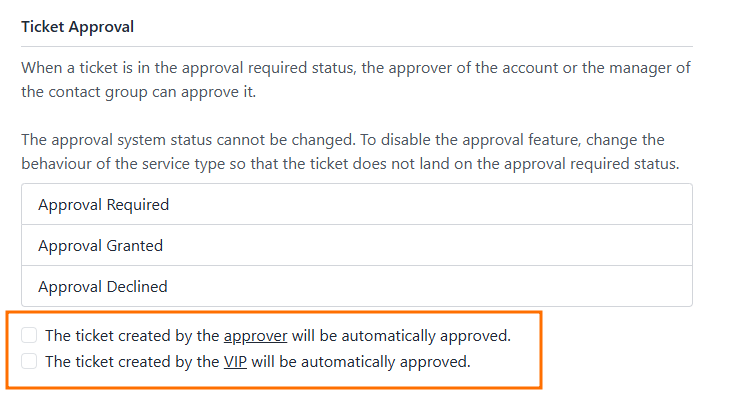
- In addition to the approval statuses, there are a pair of settings you can configure to allow approvers and VIPs to skip the approval process entirely and have their tickets automatically approved.
Approval Required for Service Types
In order to create a Service Type that requires approval, you just need to create a Service Type as usual in your Admin Console and set the status appropriately under the ticket automation tab. Any ticket submitted using this request type will inherit the approval status set for it.
Frequently Asked Questions
"Why can't I see the Approvals tab in my client portal?"
Please have an admin double-check if "Approver" permissions have been set for your account.