Table of Contents
Ticket Widget: Progress Type

The Progress type shows the status of a process, step by step. Use it to show automation runs, provisioning, approvals or any task made of stages, so the agent can see what is done, what is running and what failed.
In short: you return a list of steps. Each step has a state, a title and an optional description. The state decides the icon shown at the left. Steps can be plain, a link, or an action, like list items.
Progress works best with a refresh mode of timer or timer-or-change, so the steps update while the process runs. See the Refresh Modes article.
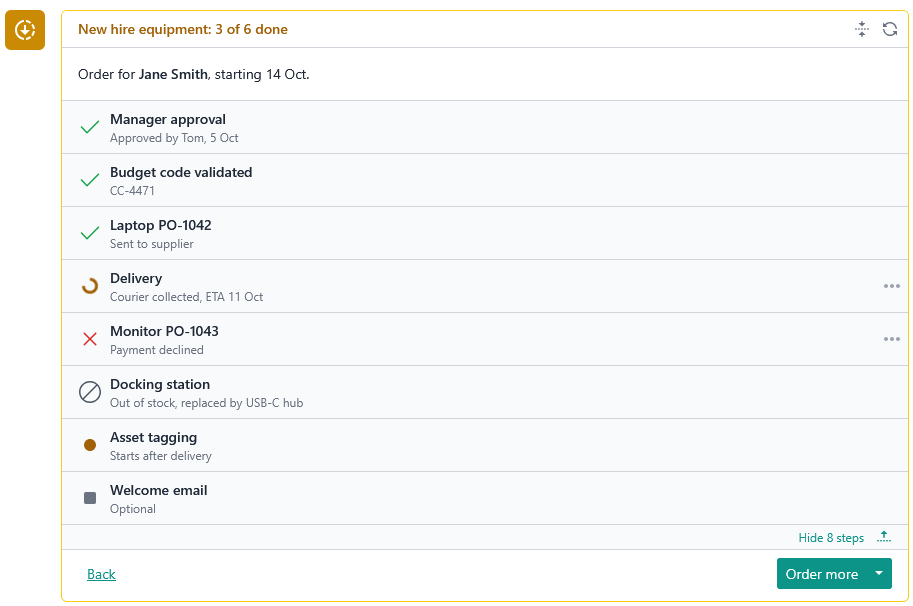
How it renders
The widget is laid out in this order: header, description, value, actions. For a Progress widget the value is the list of steps.
- If
valueis empty, the value part is not displayed. The rest of the widget still shows. - Only the first 25 steps are displayed.
- Each step has a state icon at the left, with its own colour.
- The title is required. The description is optional and shown in a subtle style.
- A "…" icon appears on a step that has
entries.
The layout is the same on small screens.
Step states
state is required on every step. It maps to a system icon. Providers cannot supply their own icon for a step.
State | Meaning |
| Inactive or not relevant |
| Waiting to start |
| Work is happening now |
| Finished successfully |
| Cancelled or skipped |
| Failed |
Only in_progress is animated. The others stay still, so a finished process looks calm.
Step behaviour
Steps work the same way as list items. The type and url decide what a click does.
default, nourl: not interactive.action, withurl: fetches theurland the response replaces this step's content.link, withurl: rendered as a link.
The same fallbacks apply: a url with no type is treated as a action, and an action or link with no url is treated as plain. Set both yourself.
A step can have entries, a "…" menu of up to 5 action or link choices. It works on any step, with or without a url.
For details, see the List Type article.
Keeping it up to date
A progress list is only useful if it changes. Use a timer refresh while the process runs, and the widget fetches new steps on its own.
{
  "type": "progress",
  "title": "Onboarding",
  "refreshMode": "timer",
  "refreshIntervalSec": 600,
  "value": [
    { "state": "success", "title": "Account created" },
    { "state": "in_progress", "title": "Provisioning laptop", "description": "Waiting for stock check" },
    { "state": "queued", "title": "Send welcome email" },
    {
      "state": "failure",
      "title": "Add to payroll",
      "description": "Employee ID missing",
      "entries": [
        { "label": "Retry", "type": "action", "url": "/widgets/onboarding/retry?step=payroll" }
      ]
    }
  ]
}
When the process is finished, return a response with refreshMode of manual, or leave it out, so the widget stops polling.
Type reference
export interface ProgressTicketWidgetContent extends TicketWidgetContentBase<
  ReadonlyArray<TicketWidgetProgressItem>
> {
  readonly type: 'progress';
}

export interface TicketWidgetProgressItem {
  readonly state: TicketWidgetProgressState;

  /**
   * Maximum 150 characters. Hard-truncated (client-side) beyond this length.
   */
  readonly title: string;
  /**
   * Maximum 250 characters. Hard-truncated (client-side) beyond this length.
   */
  readonly description?: string;

  /**
   * - 'default': item is not interactive.
   * - 'action': `url` is fetched and the response replaces this list item's content.
   * - 'link': `url` is opened as navigation (new tab).
   *
   * Fallback rules (defensive against malformed provider data):
   * - `url` present but `type` omitted or 'default' → treated as 'link'.
   * - `type` is 'action' or 'link' but `url` is missing → treated as 'default'.
   */
  readonly type?: TicketWidgetItemType;

  /**
   * Opens in a new tab/window — genuine navigation, unlike `WidgetAction.url`
   * and `TicketWidgetListItem` (type: 'action'), which fetch and replace content.
   */
  readonly url?: string;

  /**
   * When present, UI displays a "…" icon that opens these entries in a dropdown.
   * Maximum 5 items. Items beyond this are dropped.
   */
  readonly entries?: ReadonlyArray<TicketWidgetItemEntry>;
}

/**
 * Maps to a system-defined icon rendered next to the progress item —
 * providers do not supply their own icon for progress items, unlike
 * other widget content which accepts a `CustomSvgContent` icon.
 *
 * - 'neutral': static, neutral/inactive icon (e.g. dash or circle outline).
 * - 'queued': static icon indicating the item is waiting to start.
 * - 'in_progress': animated icon (e.g. spinner) indicating active work.
 * - 'success': static icon indicating successful completion (e.g. checkmark).
 * - 'cancelled': static icon indicating the item was cancelled/skipped.
 * - 'failure': static icon indicating failure (e.g. error/x mark).
 */
export type TicketWidgetProgressState =
  | 'neutral'
  | 'queued'
  | 'in_progress'
  | 'success'
  | 'cancelled'
  | 'failure';

export type TicketWidgetItemEntryType = 'action' | 'link';

export interface TicketWidgetItemEntry {
  readonly icon?: CustomSvgContent;
  /**
   * Maximum 80 characters. Hard-truncated (client-side) beyond this length.
   */
  readonly label: string;
  readonly url: string;
  readonly type: TicketWidgetItemEntryType;
}


export interface TicketWidgetContentBase<T> {
  readonly type: TicketWidgetContentType;

  readonly refreshMode?: TicketWidgetRefreshMode;
  readonly refreshIntervalSec?: number;

  readonly icon?: CustomSvgContent;

  /**
   * Maximum 256 characters. Hard-truncated (client-side) beyond this length.
   */
  readonly title: string;
  readonly titleColour?: ContentColor;

  /**
   * Markdown content, does not support HTML embed.
   * Maximum 10,000 characters. Hard-truncated (client-side) beyond this length.
   */
  readonly description?: string;

  readonly borderColour?: ContentColor;

  readonly value: T;

  /**
   * Action rendered on the far left, isolated from the secondary/primary
   * action group (e.g. "back" in a multi-step form).
   *
   * Never gated by form validation: always enabled, even when the form is
   * incomplete. When `form` is present, the current (possibly partial)
   * answers are sent with the request so the provider can restore them
   * (e.g. when the user steps back). This is NOT a submission; the provider
   * must not validate, persist or act on the answers.
   */
  readonly leadingAction?: TicketWidgetAction;

  /**
   * Secondary action rendered on the right, before the primary action.
   * Typically a lower-emphasis action (e.g. "cancel", "skip").
   *
   * Never gated by form validation: always enabled, even when the form is
   * incomplete. When `form` is present, the current (possibly partial)
   * answers are sent with the request so the provider can remember them.
   * This is NOT a submission; the provider must not validate, persist or
   * act on the answers.
   */
  readonly secondaryAction?: TicketWidgetAction;

  /**
   * Primary action rendered on the far right, the main call-to-action
   * for this widget (e.g. "next", "submit").
   *
   * When `form` is present, disabled until the form is complete (all
   * required fields answered). This is the only action that submits the
   * form: the answers are sent as a submission, and the provider should
   * validate and act on them.
   */
  readonly primaryAction?: TicketWidgetAction;

  /**
   * Answers submitted by the user, keyed by field identifier, and sent back
   * to the provider on the next request.
   *
   * Limits:
   * - Maximum 20 entries. Entries beyond this are dropped.
   * - Key: maximum 100 characters. Hard-truncated (client-side) beyond this length.
   * - A null result is replaced with an empty result.
   * - Invalid results are dropped, not converted.
   * - Each choice identifier is hard-truncated (client-side) to 100 characters.
   * - Maximum 10 choices per result. Choices beyond this are dropped.
   */
  readonly form?: Record<string, TicketWidgetFieldResult>;

  /**
   * Arbitrary provider-defined data carried across requests. The client
   * persists whatever the provider returns here and sends it back verbatim
   * on the next request. Providers do not need to store session state
   * themselves; the round trip through the client is the only state store.
   *
   * Limits (anything exceeding them is dropped, not truncated):
   * - Maximum 20 entries.
   * - Key: maximum 100 characters.
   * - Value: maximum 1,000 characters.
   * - Non-string values are dropped, not converted.
   */
  readonly state?: Record<string, string>;
}